Google Account Security Settings: A 2026 Checklist for Kansas City Businesses

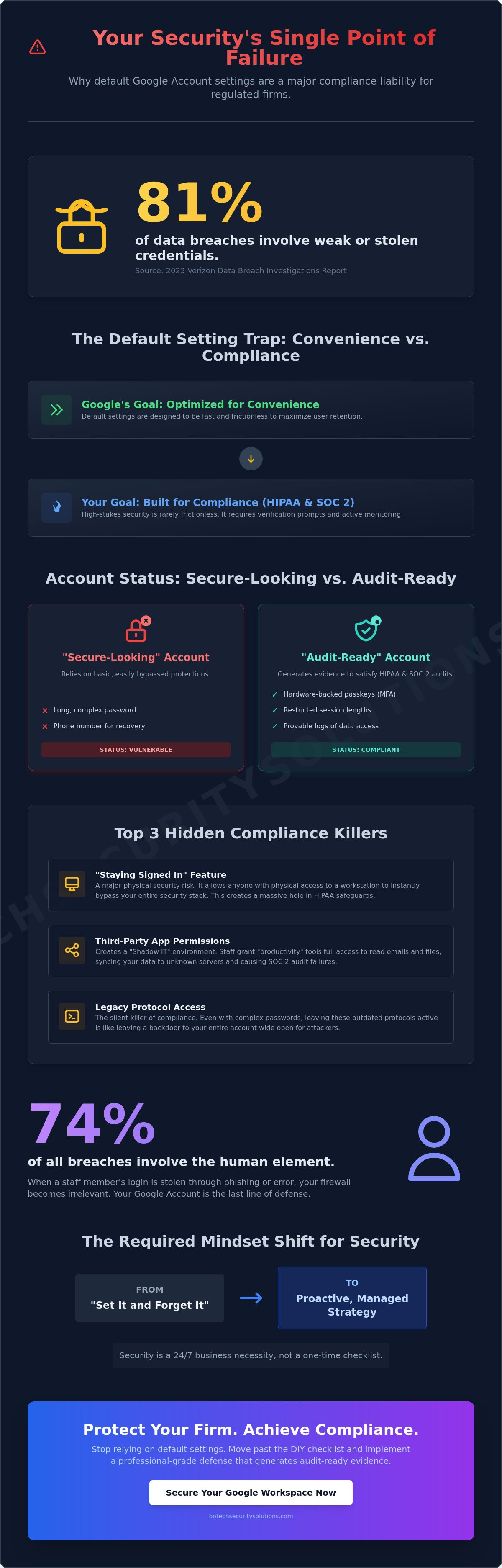
Your complex password isn't a security strategy; it's a single point of failure that could trigger a $50,000 HIPAA fine before your morning coffee gets cold. Most Kansas City firm owners assume they're protected because they use long character strings, but the reality is that 81 percent of data breaches involve weak or stolen credentials according to the 2023 Verizon Data Breach Investigations Report. You've likely felt overwhelmed by the labyrinth of google account security settings, fearing that one missed toggle could lead to a catastrophic legal malpractice claim.
I understand the anxiety of managing sensitive client data while navigating menus that feel designed for teenagers rather than regulated professionals. You need to know exactly which configurations are mandatory for compliance and which ones are just noise. I'll show you how to secure your firm's most critical gateway with a configuration that satisfies both SOC 2 and HIPAA requirements for 2026.
This checklist provides a direct, non-technical roadmap to harden your accounts and protect your reputation in the Kansas City market. We'll move past the basic defaults to build a professional-grade defense that gives you genuine peace of mind.
Key Takeaways
- Understand why default configurations are a compliance liability and how to transform your Google Workspace into a secure "central nervous system" for your professional practice.
- Follow a prioritized sequence to harden your google account security settings, moving beyond basic protections to implement the bare minimum requirements for regulated firms.
- Learn to distinguish between standard security features and the specific compliance mechanisms necessary to satisfy HIPAA and SOC 2 audit requirements.
- Address the human-centric risks in the Kansas City metro that technical menus cannot solve, ensuring your staff doesn't inadvertently bypass your strongest defenses.
- Shift from a "set it and forget it" mentality to a proactive, managed strategy that treats security as a 24/7 business necessity rather than a one-time checklist.
Why Your Google Account Security Settings Are a Compliance Liability
Your Google account is the central nervous system of your Kansas City professional practice. It holds your calendar, your client communications, and your most sensitive internal documents. Most firm owners in Overland Park believe they are protected because they use a long password. This is a dangerous myth that ignores how modern breaches actually happen.
The uncomfortable truth is that default google account security settings are optimized for user retention. Google wants your experience to be fast and frictionless so you never leave their ecosystem. High-stakes security is rarely frictionless. If your Google Account isn't occasionally "annoying" your employees with verification prompts, it's probably not secure enough for a regulated business.
To better understand this concept, watch this helpful video:
There is a massive gap between a "secure-looking" account and one that generates audit-ready compliance evidence. A secure-looking account has a password and maybe a phone number for recovery. An audit-ready account has hardware-backed passkeys, restricted session lengths, and logs that prove exactly who accessed what data. Organizations That Cannot Afford to Get This Wrong understand that visibility is just as important as prevention.
Complacency carries a high cost for firms in Lee’s Summit and the surrounding metro area. A single misconfiguration doesn't just lead to an email leak; it creates a cascading failure across your entire digital footprint. You are either intentionally protected or you are an easy target. Most are not as protected as they think.
The Gateway to Your Firm’s Sensitive Data
A single compromised account provides a literal map of your entire Kansas City network. Hackers don't just stop at your inbox. They use that access to pivot into your shared drives and financial records. They look for attorney-client privilege documents and Protected Health Information (PHI) that can be held for ransom.
The risk is not theoretical or distant. The 2025 Data Breach Investigations Report by Verizon states that 74% of all breaches involve the human element, which is primarily driven by credential theft. When a staff member's login is stolen, your firewall becomes irrelevant. Your google account security settings are the only barrier left between a criminal and your firm's reputation.
For law firms and medical clinics, this isn't just a technical glitch. It is a direct violation of professional ethics and state privacy laws. If you cannot prove how a breach was contained, your liability increases exponentially. Compliance requires more than a "set it and forget it" mindset; it requires active evidence generation.
Convenience vs. Compliance: The Default Setting Trap
The "staying signed in" feature is a major physical security risk for busy clinics in Overland Park. It allows anyone with physical access to a workstation to bypass your security stack instantly. While it saves five seconds for a nurse or clerk, it creates a massive hole in your HIPAA safeguards. Real security requires session timeouts that force re-authentication.
Third-party app permissions are another silent killer of compliance. Employees often grant access to "productivity tools" or "PDF converters" that then have full permission to read your emails and files. This creates a "shadow IT" environment where your data is being synced to unknown servers without your oversight. This lack of control is a primary reason for SOC 2 failures during the audit phase.
A DIY approach to these settings often leaves Kansas City businesses vulnerable because they focus on the wrong things. You might have complex passwords, but if you haven't disabled legacy protocol access, your account is still wide open. You need Compliance Services that look at the entire architecture, not just the login screen. Most firms think they are compliant because they have a policy document; the reality is that they lack the technical controls to enforce it.
The Essential Google Security Checklist: Hardening the Front Door
Your Google Workspace is the digital perimeter of your firm. If that perimeter fails, your client records, billing data, and privileged communications are effectively public property. Most office managers believe the default google account security settings provide a safety net. They don't.
This checklist is for organizations that cannot afford to get this wrong. It focuses on high-impact changes that take less than ten minutes but provide enterprise-grade protection. If you haven't touched these settings in the last quarter, you're likely out of compliance with modern cyber insurance requirements.
Mandatory Multi-Factor Authentication (MFA) Protocols
SMS-based codes are no longer a viable security measure for Kansas City legal or medical firms. Interception attacks and SIM swapping have made text-based MFA a liability rather than a defense. NIST Special Publication 800-63B has long warned against this practice for high-assurance environments.
Professional standards in 2026 require physical security keys or authenticator apps. You must enforce these protocols at the organizational level in the Google Admin console. This prevents employees from opting out or choosing weaker, less secure methods that jeopardize your HIPAA or PCI DSS compliance standing.
Audit and Cleanse Third-Party Access
Data breaches often happen through the back door. Employees frequently grant "Full Account Access" to third-party scheduling tools or browser extensions without reading the permissions. This creates a persistent link to your data that remains active even if the employee stops using the tool.
We recently worked with a Kansas City law firm where an intern connected a "free" PDF converter to their corporate account. That single app had permission to read every email in the firm's inbox. Revoking that access took seconds, but the risk had been active for six months.
Review your third-party app list today. Follow the 30-day rule: if the application hasn't been utilized within the last month, revoke its access immediately. You must remain vigilant against inadvertent actions where personal tools are connected to corporate accounts.
Password Management and Recovery Settings
Stop using passwords and start using unique, complex passphrases. A 16-character phrase is exponentially harder to crack than a standard 8-character password with a capital letter and a symbol. This is a fundamental shift in how we manage google account security settings for a remote or hybrid workforce.
Verify your recovery email and phone number every 90 days. In 2026, this frequency is the benchmark for maintaining account integrity. If your recovery information is outdated, a locked account becomes a permanent loss of data. If you're unsure if your current configuration meets these standards, it may be time to reach out for a professional review of your workspace.
Aligning Google Workspace with HIPAA and SOC 2 Standards
Healthcare practices in Kansas City and financial firms in Tulsa often confuse a secure setup with a compliant one. Security is the lock on the door. Compliance is the logbook showing who held the key and when they used it. Your google account security settings provide the technical controls, but they aren't a substitute for a formal compliance program. Most small business owners believe they are protected because they use a strong password. They are wrong. Without the right administrative framework, your technical settings are just unused potential.
Executing the Google Business Associate Agreement
A Kansas City clinic using Google Drive for patient records without a signed Business Associate Agreement (BAA) is committing an automatic HIPAA violation. It doesn't matter how strong your password is. You must navigate to the Google Workspace Admin console, select Account Settings, and sign the BAA under the Legal and Compliance section. This document is not a magic shield. It is a shared responsibility agreement where Google secures the servers while you remain responsible for how your staff handles data. If you haven't signed this, you are legally exposed the moment PHI touches your inbox.
Data Loss Prevention (DLP) and Content Shielding
Data Loss Prevention (DLP) is the only way to prevent sensitive Kansas City patient data from leaving your domain. You should configure rules that automatically block any email containing Social Security numbers or medical IDs. For legal teams, S/MIME encryption is the standard for protecting attorney-client privilege during high-stakes litigation. BoTech recommends automated monitoring over manual employee compliance. Humans make mistakes when they are busy or tired. Automated systems never forget to check a file for sensitive strings. Relying on a staff member's memory is a strategy that fails 100% of the time.
Logging and Reporting for Audit Readiness
Audit readiness requires more than a yearly checkup. SOC 2 standards now demand continuous monitoring rather than point-in-time snapshots. You need Admin Audit Logs to prove exactly who accessed specific files and when those actions occurred. If you cannot produce these logs during an investigation, you have no defense against claims of negligence. Your google account security settings must be configured to retain these logs for the duration required by your specific industry. Effective Compliance Services turn these raw logs into evidence that satisfies federal auditors. This move from reactive to proactive is what separates a professional operation from a vulnerable one.
Managing the Human Risk: Google Account Security Settings Beyond the Menu
Technical configurations are only half the battle. You can perfect your google account security settings and still lose everything to a single click from a tired receptionist in Leawood. Security isn't just a menu toggle; it's a culture of skepticism. Most Kansas City firms treat security as a "set it and forget it" task. This complacency is exactly what attackers exploit. Security Awareness Training is no longer optional for organizations that cannot afford to get this wrong. It must be a managed service that evolves with the threat landscape. A static compliance document from three years ago won't stop a modern social engineering attack. You need a proactive partner who treats employee behavior as a critical infrastructure component.Phishing Prevention for Kansas City Teams
Imagine an office manager at a Brookside medical clinic receiving an "urgent" email from a known local partner. The email claims a payment failed and provides a link to a cloned Google login page. Even the best google account security settings won't stop a user from handing over their credentials voluntarily. According to the 2024 Proofpoint State of the Phish report, 71% of users took a risky action such as clicking a malicious link. We recommend the Advanced Protection Program for high-risk users because it mandates the use of physical security keys. This hardware-based approach makes stolen passwords useless to a remote attacker. Regular simulated phishing campaigns are the only way to build the muscle memory your team needs to spot these fakes. Most are not prepared for the sophistication of 2026 credential harvesting techniques without this ongoing practice.The Danger of Public Wi-Fi in the KC Metro
Your employees are likely working from coffee shops in the Country Club Plaza or Overland Park. They log into company accounts using unencrypted public Wi-Fi. This creates a massive "roaming" risk that traditional office firewalls cannot see. You are either protected everywhere or you are not protected at all. Endpoint Protection is the standard for securing devices that live outside your four walls. It ensures that the security follows the device regardless of the network it joins. BoTech provides 24/7 monitoring to catch suspicious activity the moment a device connects from a vulnerable location. This constant vigilance is what separates a secure firm from one waiting for a breach notification. Organizations that cannot afford to get this wrong understand that human behavior is the most volatile variable in their security stack. You need a partner who manages the people as much as the technology. Explore our managed security servicesWhy Managed Security Outperforms a DIY Checklist
A checklist is a static document in a dynamic threat environment. You can follow every step for your google account security settings today and find your configurations obsolete by Tuesday. Google pushed hundreds of updates to its security interfaces over the last year. If you aren't monitoring these changes daily, you aren't actually protected. You're just lucky for now.
BoTech acts as your Strategic Ally. We don't just hand you a PDF and wish you well. We take full ownership of the environment. Most small business owners in Kansas City treat security like a weekend home improvement project. They do it once and hope it sticks. Real security requires a 24/7 commitment that doesn't fit into a busy office manager's schedule. You are either protected or you are not. There is no middle ground when a data breach occurs.
We provide enterprise-grade protection through a flat monthly rate model. This isn't about billable hours or surprise invoices. It's about predictable costs for organizations that cannot afford to get this wrong. You get the same level of oversight that a Fortune 500 company enjoys but at a price built for a local law firm or medical clinic. Our approach ensures that your Managed IT Support Services in Kansas City prioritize security as the foundation of support, not an afterthought.
Continuous Monitoring vs. Periodic Checkups
A checklist is only valid until the next threat actor finds a new exploit. We use 24/7 Managed Detection and Response (MDR) to contain incidents the moment they happen. If a login attempt occurs from an unrecognized IP in Eastern Europe at 3:00 AM, a checklist won't stop it. Our monitoring will. Most organizations think they are secure because they checked a few boxes. Most are not. We move you from the anxiety of "what if" to the confidence of a managed environment. This is the difference between a compliance document that sits in a drawer and a compliance program that generates ongoing evidence of safety.
Your Next Actionable Step for Account Safety
Take five minutes right now to visit the "Security Checkup" within your Google account. Don't just click through the recommendations to make the red icons go away. View every setting through a compliance lens. Ask yourself if you have the logs required to prove that setting was active during a HIPAA or PCI DSS audit. If you can't produce the evidence, the setting might as well not exist.
If you aren't sure where your vulnerabilities lie, we're here to help. We invite you to a free assessment to find out where you actually stand. Stop guessing and start knowing. Schedule your free security assessment with BoTech today and secure your firm's future.
Securing Your Kansas City Firm for the Next Threat Cycle
Most local business owners believe their data is safe because they clicked a few boxes in a setup wizard. The reality is that your google account security settings are only as strong as the evidence you can produce during a HIPAA or SOC 2 audit. A checklist is a starting point; it's not a defense strategy. Real protection requires moving from a static document to an active compliance program that generates proof of security every single day.
You've seen how managed security outperforms the DIY approach by filling the gaps that human error inevitably creates. Veteran-owned and operated, BoTech provides enterprise-grade cybersecurity at a flat monthly rate. We don't just set it and forget it. We provide 24/7 Managed Detection and Response to stop threats before they become headlines. Organizations that cannot afford to get this wrong know that "good enough" is a liability.
Take one step right now. Open your Google Admin Console and review the "Third-party apps with account access" list. Revoke any legacy permissions that your team no longer uses to reduce your attack surface immediately. You can't protect what you aren't monitoring.
Find out where your Kansas City firm actually stands with a free security assessment
Your organization deserves the confidence that comes with professional, vigilant oversight.
Frequently Asked Questions
Is Google 2-Step Verification enough to satisfy HIPAA requirements for my Kansas City practice?
No, 2-Step Verification alone is insufficient for full HIPAA compliance. Under HIPAA Security Rule 45 CFR § 164.312(a)(1), you must implement technical policies and procedures for electronic information systems that maintain protected health information. While it provides a foundational layer of security, you still require a signed Business Associate Agreement and ongoing audit logs that prove who accessed specific data and when.
How do I know if my Google account has been compromised by a third-party app?
You can identify unauthorized access by reviewing the third-party apps list within your security dashboard. Look for apps you don't recognize or those with "Full Account Access" permissions that haven't been used in over 90 days. A 2023 report by the Identity Theft Resource Center noted that unauthorized third-party access remains a top vector for business data breaches, making this a critical check for your team.
What is the Google Advanced Protection Program and should my employees use it?
The Google Advanced Protection Program is a rigorous security tier designed for high-risk users that mandates the use of physical security keys for all logins. Your employees should use it if they handle sensitive litigation files or patient records, as it blocks the majority of non-service provider login attempts and performs deeper scans on incoming downloads. This program is essential for Kansas City organizations that cannot afford to get this wrong.
Can I use a personal Gmail account for my law firm if I change the security settings?
You cannot legally or ethically use a personal Gmail account for a law firm because it lacks the necessary enterprise-grade security and compliance controls. Personal accounts don't provide the vaulting capabilities or the administrative oversight required by the American Bar Association Formal Opinion 477R for protecting client confidentiality. Professional firms need the centralized control found in paid workspace environments to manage their google account security settings effectively.
How often should a Kansas City business conduct a Google account security audit?
You should conduct a comprehensive security audit every 90 days to align with standard industry best practices like those found in the NIST Cybersecurity Framework. Waiting for an annual review leaves a 270 day window where deactivated employees or forgotten third-party integrations can remain active. Regular audits ensure your google account security settings are updated to reflect your current staff roster and your actual risk profile.
What happens if an employee loses their MFA device or security key?
If an employee loses their primary authentication factor, an administrator must use a pre-generated backup code or a temporary security bypass to restore access. This process must be documented in your incident response log to satisfy audit requirements for 2026 compliance standards. Without a managed recovery plan, you risk permanent data lockout or a 48 hour delay while the platform verifies the identity of the account owner.
Does BoTech Security Solutions manage Google Workspace settings for small businesses?
We manage the entire security and compliance infrastructure for Kansas City firms that require enterprise protection at a predictable rate. Our team serves as the vigilant guardian for your digital environment, handling everything from initial configuration to monthly evidence generation for your compliance program. We ensure your settings are never left to chance or handled by someone who is just guessing.