

Backup and Disaster Recovery: The 2026 Strategy for Regulated Kansas City Businesses
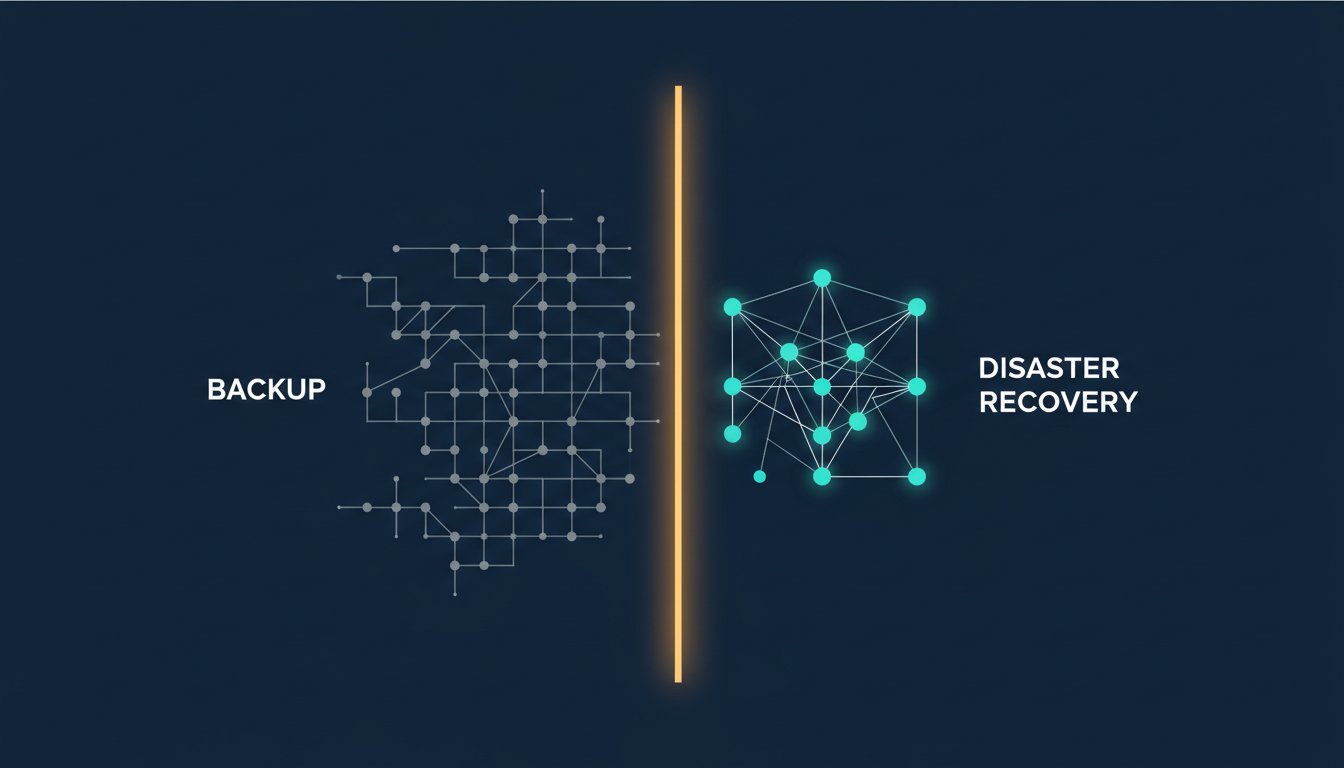
Imagine sitting at your desk in Overland Park when your server suddenly goes dark. You check your cloud storage and see a reassuring green checkmark, yet your staff is still sitting idle. You are losing up to $427 every minute according to 2025 industry averages while your patients or clients wait in the lobby. This is the exact moment most local business owners realize their backup and disaster recovery strategy is just a list of files, not a path back to productivity.
You understand that every hour of downtime puts you closer to a HIPAA violation or a failed SOC 2 audit. It is frustrating to pay for protection that does not actually protect your billable hours. You deserve a system that provides more than just a false sense of security.
You will learn the critical difference between having a data backup and possessing a verifiable disaster recovery plan that satisfies HIPAA and SOC 2 requirements. We will break down how to generate audit-ready compliance evidence and move your recovery timeline from days to minutes. This strategy ensures your organization stays resilient against the 149 percent surge in ransomware attacks reported by U.S. insurance claims in 2025.
Key Takeaways:
- Stop treating backups as a safety net; they are just raw data without a validated recovery orchestration.
- Define your RPO and RTO to move from days of expensive downtime to mere minutes of interruption.
- Shift from static compliance documents to audit-ready evidence that proves your backup and disaster recovery systems actually work under pressure.
- Implement a modern 3-2-1 strategy to protect against Kansas City’s specific risks, including severe weather and regional power instability.
- Recognize that HIPAA and SOC 2 requirements demand continuous validation rather than "set it and forget it" assumptions.
Beyond the File: Why Backup and Disaster Recovery Are Not Identical
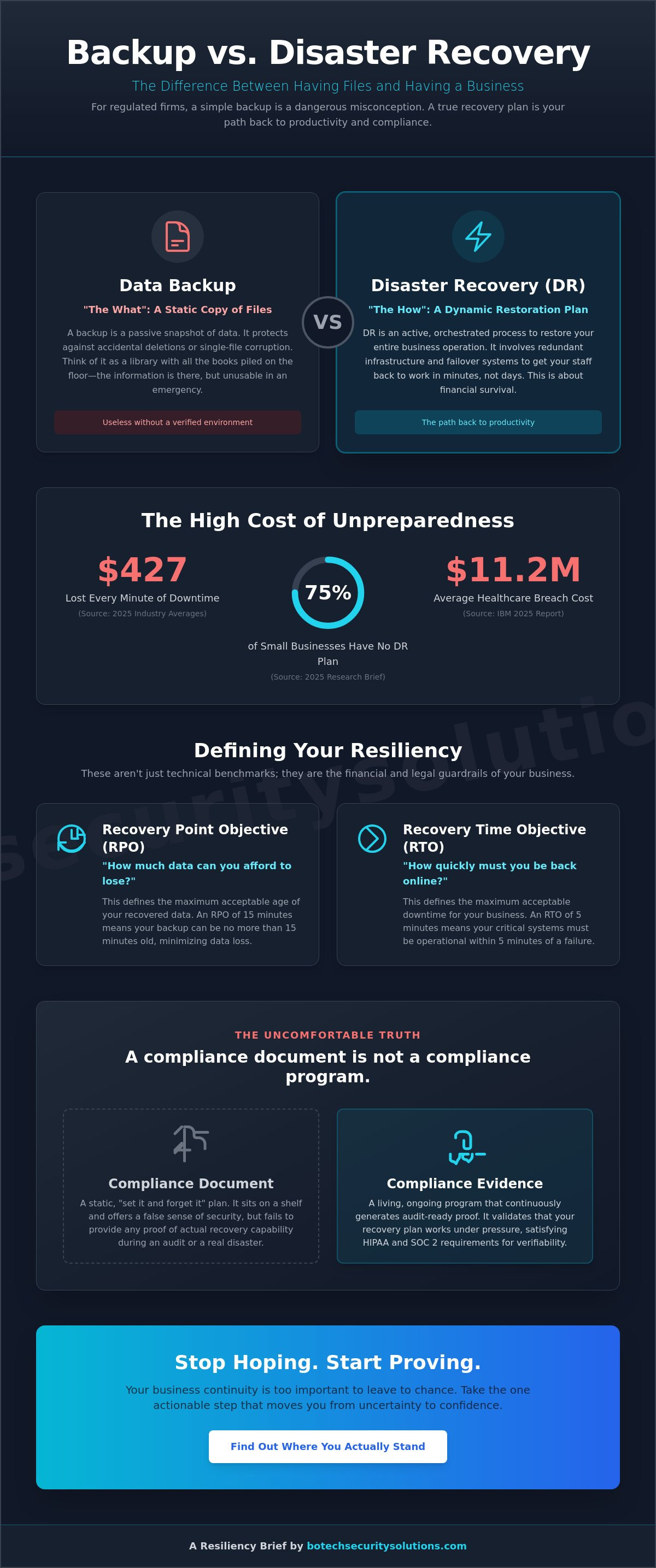
Most business owners in Kansas City treat their data like a photo album. They take a snapshot, tuck it away in the cloud, and assume they can relive those moments whenever they want. This is a dangerous misconception that leaves your firm exposed. A backup is a static copy of your files, while disaster recovery is the dynamic orchestration required to get your staff back to work after a failure.
To better understand the fundamental differences between these two concepts, watch this helpful video:
If your server fails on a Tuesday morning, having a backup only means you haven't lost your data forever. It doesn't mean you can see patients or file motions by Tuesday afternoon. Without a functional backup and disaster recovery strategy, you are looking at days of manual rebuilding. According to 2025 industry research, it takes an average of 241 days to identify and contain a data breach. You cannot afford to wait that long to resume your primary operations.
The Static Nature of Data Backups
Think of a backup as a library where the books are scattered on the floor without a catalog. You have the information, but you can't find what you need to solve a problem right now. Backups protect you from accidental deletions or a single corrupted file. They are a necessary foundation, but they are entirely passive. The uncomfortable truth that most vendors hide is that a backup is useless if you don't have a verified environment ready to host that data. Approximately 75 percent of small businesses have no documented disaster recovery plan according to the 2025 Research Brief. They possess the data but have no infrastructure to actually use it during an emergency.
The Dynamic Architecture of Disaster Recovery
Disaster recovery focuses on the restoration of your entire business operation, not just your folders. It involves redundant infrastructure that can take over when your main office goes dark. This process often uses a mechanism called "failover," which allows your applications to switch to a secondary server almost instantly. For a regulated law firm or healthcare provider, this is the difference between a minor hiccup and a catastrophic loss of revenue. The healthcare industry has faced the highest breach costs for 15 consecutive years, averaging $11.2 million in 2025. A dynamic DR plan isn't just about technical uptime; it is about financial survival. You can explore how we build these resilient systems on our Managed Security services page.
The Technical Pillars of Resiliency: RPO, RTO, and Regulatory Mandates
Most firms treat their recovery strategy like a wish list. They hope they won't lose much data and hope they can get back to work quickly. In a regulated environment, hope is not a strategy. You must define your backup and disaster recovery performance using two specific metrics: Recovery Point Objective (RPO) and Recovery Time Objective (RTO). These are not just technical benchmarks; they are the legal and financial guardrails of your organization.
The stakes are defined by federal law. The HIPAA Security Rule, specifically 45 CFR § 164.308(a)(7), mandates that covered entities establish and implement a contingency plan. This includes data backup, disaster recovery, and emergency mode operation plans. Similarly, SOC 2 Trust Services Criteria require you to prove the availability and integrity of your systems. If you cannot produce evidence that your RPO and RTO meet these standards, you are essentially operating in a state of non-compliance. You can find more detailed requirements in our compliance resource library.
The cost of failing to meet these objectives is staggering. According to the 2025 IBM Cost of a Data Breach Report, the average cost of a breach in the U.S. reached an all-time high of $10.22 million. For small businesses, the immediate pain is felt in minutes. Research shows that SMBs lose between $137 and $427 for every single minute of downtime. These figures align with CISA disaster recovery guidelines which emphasize that business continuity depends on pre-defined recovery thresholds.
Calculating Your Recovery Point Objective
Your RPO determines how much data your firm can afford to lose forever. If you back up your files at 5:00 PM every day and your server crashes at 4:00 PM the next day, you have lost 23 hours of work. For a law firm, this could mean losing a day's worth of billable research or sensitive client communications. Financial services often require continuous data protection to ensure their RPO is measured in seconds rather than hours. You must decide if your attorney-client privilege is protected when a full day of case notes simply vanishes.
Defining Your Recovery Time Objective
Your RTO is the maximum amount of time your practice can remain offline before the damage becomes permanent. Reputational damage often happens much faster than financial recovery. If a medical practice cannot access patient records for three days, patients will find a provider who can. Your RTO influences your hardware choices. Achieving a 15-minute recovery requires significantly more robust infrastructure than a 24-hour recovery. If you are unsure where your current infrastructure falls, you should request a baseline technical review to see the reality of your current limits.
Backup vs. Disaster Recovery: The Uncomfortable Truth for Regulated Firms
Many Kansas City business owners fall for the "set it and forget it" myth. They assume that as long as their backup software displays a green checkmark, their business is safe. The uncomfortable truth is that a backup is just a pile of raw data. Without a validated recovery process, that data is essentially locked in a vault you have lost the key to.
Relying on untested backups creates a massive liability for firms in highly scrutinized sectors. In 2025, ransomware attacks in the U.S. surged by 149 percent according to the 2025 Research Brief. If your backup and disaster recovery system fails on day one of an attack, your legal accountability does not vanish. You are still responsible for notifying affected individuals under Missouri law (Mo. Rev. Stat. § 407.1500) within 45 days. A plan that exists only on paper is not a defense against a negligence claim.
The Compliance Evidence Gap
Auditors for HIPAA or SOC 2 do not care about your intentions. They demand proof. There is a significant gap between a compliance document and actual compliance evidence. A static PDF stored in a folder is just a wish. True security comes from automated evidence collection that logs every successful restoration test. To understand how this works in a real-world setting, you should review our hipaa compliance solution. We move firms away from "hoping" it works to "knowing" it works through continuous validation.
Concrete Scenario: The Ransomware Reality
Consider two law firms in downtown Kansas City hit by a Friday afternoon ransomware attack. Firm A has a "backup only" mindset. They spend the next seven days manually rebuilding servers and praying the data isn't corrupted. They lose a week of billable hours and eventually face a $353,000 insurance claim. This is the average claim size for 2025 according to industry data.
Firm B invested in a true backup and disaster recovery strategy. When the attack hits, their systems failover to a secure cloud environment. Their staff is back to work in four hours. The data remains intact, and the firm generates a report for their auditors showing exactly when the breach was contained. One firm faces an existential crisis; the other faces a manageable technical hurdle. The difference is not the technology, but the commitment to verifiable recovery evidence.
Building a Kansas City Resiliency Strategy: Beyond the Cloud
Kansas City is famous for its volatile weather. A tornado doesn't care about your cloud storage if the local fiber lines are shredded or the regional power grid fails. A resilient backup and disaster recovery strategy must account for these physical Midwest realities. You need to move beyond simple cloud uploads and embrace a modernized 3-2-1 rule. This means maintaining three copies of your data on two different types of media, with one copy stored in a completely different geographic region.
Prevention is always more cost-effective than recovery. Implementing managed detection and response services kansas city allows you to neutralize a threat before it necessitates a full system restoration. Most disasters are not acts of God. They are successful infiltrations that could have been stopped at the network perimeter. Stopping an encryption event in its tracks is the best way to ensure your disaster recovery plan stays in its folder rather than becoming your only hope for survival.
Geographical Redundancy for the Midwest
Your backup should never be in the same zip code as your primary office. If a localized flood or fire hits your building, there is a high probability it will affect the local data center hosting your supposedly off-site copy. Kansas City passed new zoning regulations in January 2026 that restrict where data centers can be built and require utility capacity letters. These rules may impact the availability of local recovery nodes. You need a recovery site that remains accessible even when the Kansas City infrastructure is under significant stress. This ensures that a regional outage doesn't leave your law firm or medical practice completely paralyzed.
The Role of Patch Management in DR
Disaster recovery is often the final stop on a train of avoidable mistakes. Expert it consultants prioritize patch management as a primary defense against total system failure. Unpatched vulnerabilities are the leading cause of the 149 percent ransomware surge reported in 2025. By closing these digital doors, you dramatically reduce the probability of needing an expensive, high-stakes recovery operation. It's a simple truth that most vendors ignore: the best disaster recovery plan is the one you never have to use. If you want to see where your current defenses are failing, you should schedule a vulnerability assessment to identify your highest risks.
The BoTech Distinction: Turning Compliance Documents into Verifiable Evidence
Most IT vendors treat security as a product they can install and invoice. BoTech Security Solutions treats it as a mission that requires constant vigilance. A static plan is just a document; a resilient organization relies on evidence. Our approach to backup and disaster recovery is built on the principle of continuous validation. We don't just hope your systems will work when a crisis hits. We know they will because we test them every single day.
Our veteran-led team focuses on mission-critical reliability for firms that cannot afford a second of unnecessary downtime. We move you away from the anxiety of potential vulnerabilities toward the confidence of comprehensive protection. This transition is essential for any regulated business in Kansas City that values results over marketing jargon. You can see how we integrate these protocols into our broader Managed Security services.
Continuous Validation vs. Annual Testing
The "annual recovery test" is a dangerous relic of a slower threat landscape. If you only verify your data once a year, you are essentially gambling with 364 days of uncertainty. A system that worked last June could easily fail today due to a minor configuration drift or a silent corruption. BoTech Security Solutions eliminates this gap by automating the verification of backup integrity. We ensure that every copy is not only present but fully functional and ready for an immediate failover.
This proactive model provides the peace of mind that comes from 24/7 endpoint monitoring and constant validation. We take ownership of your safety so you can focus on your practice. By consolidating complex compliance needs into a single point of contact, we simplify the dual requirements of technical safety and regulatory evidence. You get more than a vendor; you get a partner dedicated to preventing worst-case scenarios.
Your Immediate Next Step for Security
You can take one specific action right now to gauge your actual level of protection. Contact your current IT provider and ask this exact question: "When was the last time we performed a full-system restoration test, and can I see the success log?" If their answer is "don't worry, we have backups," they are answering the wrong question. Having a backup is a passive state; having a restoration log is a verified fact.
Check your most recent restoration log today. If your provider cannot produce one within an hour, your firm is likely operating with a false sense of security. You deserve to know exactly where your data stands before a disaster forces the issue. This transparency is the cornerstone of a mature compliance program. If you are ready to stop guessing and start knowing, you should request a baseline assessment to find out where you actually stand.
Secure Your Firm's Future Through Verifiable Resilience
You now understand that a backup is just a static file while true recovery is a dynamic business process. Relying on a green checkmark without a validated restoration log is a gamble that regulated firms in Kansas City can't afford to take. You need to move beyond the cloud to account for local infrastructure risks and the surge in modern ransomware attacks. True compliance isn't found in a dusty folder; it's found in the automated evidence of daily testing.
BoTech Security Solutions provides this level of certainty as a veteran-owned partner specializing in HIPAA, SOC 2, and PCI DSS requirements. We consolidate your technical protection and regulatory evidence into a single point of contact for a flat monthly rate. You can stop wondering if your systems will fail and start knowing they are secure. It's time to bridge the gap between having a data copy and possessing a comprehensive backup and disaster recovery strategy that actually works.
Take the first step toward total protection today. Find out where your firm actually stands with a free Security and Compliance Assessment. We are here to help you build a safer, more resilient organization.
Frequently Asked Questions
What is the difference between data backup and disaster recovery?
Backup is the static act of copying your files for safekeeping, while disaster recovery is the dynamic process of restoring your entire business operation. Think of a backup as a spare tire and disaster recovery as the tools, the jack, and the mechanical knowledge required to get back on the road. Without a recovery plan, your backed-up data is just a collection of files that you cannot actually use to serve patients or clients.
Does HIPAA require a disaster recovery plan for small practices?
Yes, HIPAA mandates a comprehensive contingency plan for all covered entities regardless of their size. Under 45 CFR § 164.308(a)(7), you are required to establish and implement a data backup plan, a disaster recovery plan, and an emergency mode operations plan. Many small practices fail audits because they possess the data backups but lack the documented, tested procedures required to prove they can restore operations in a crisis.
How often should a law firm test its disaster recovery plan?
You should verify your backup integrity daily through automation and perform full-scale restoration simulations at least once per quarter. Annual testing is no longer sufficient because your digital environment changes every time you update software or add a new user. Frequent testing provides the audit-ready evidence needed to prove your firm can meet its Recovery Time Objectives during a real-world failure.
Can cloud storage services like OneDrive or Dropbox count as a backup?
No, OneDrive and Dropbox are file synchronization services that lack the essential features of a true backup and disaster recovery solution. If a staff member accidentally deletes a file or ransomware encrypts a folder, those changes are instantly synced to the cloud, potentially destroying your only copy. You need a separate, versioned backup that exists independently of your primary productivity suite to ensure your data remains protected.
What are the most common causes of data disasters for Kansas City businesses?
Ransomware remains the primary threat, but local businesses also face significant risks from severe weather and regional power instability. The October 2023 cyberattack on the Kansas Judicial Branch's IT systems, which disrupted online access for several months, serves as a sobering reminder of regional vulnerability. Beyond cyber threats, volatile Midwest storms can physically compromise your on-site servers in Overland Park or Lee's Summit without any warning.
How much downtime is considered "acceptable" for a regulated firm?
Most regulated firms consider anything beyond one hour of downtime to be unacceptable due to the extreme cost of lost billable time. As previously mentioned, the financial drain of an idle staff can reach hundreds of dollars per minute. If your recovery timeline is measured in days rather than minutes, you are essentially planning for a business closure rather than a successful restoration of services.
What is the 3-2-1 backup rule and is it still relevant in 2026?
The 3-2-1 rule is a foundational requirement in 2026, though it now must include immutable, ransomware-proof storage to be effective. You should maintain three copies of your data on two different media types, with one copy stored off-site. For a modern backup and disaster recovery strategy, the off-site copy must be protected by encryption and logical air-gapping to prevent attackers from deleting your safety net during an intrusion.
How does disaster recovery impact my SOC 2 compliance audit?
Disaster recovery is a critical component of the SOC 2 Availability and Confidentiality Trust Services Criteria. Auditors will look for verifiable evidence that your organization can maintain system availability despite a localized failure or a cyberattack. A well-documented and regularly tested recovery plan proves to your clients that their sensitive data is protected by a disciplined, no-nonsense security program rather than a vague promise.
What is a Vulnerability Assessment? The 2026 Security Guide for Regulated SMBs
How to Make a Strong Password: A 2026 Guide for Kansas City Businesses That Cannot Afford a Breach
Managed cybersecurity and compliance for healthcare practices, law firms, and financial services organizations. Delivered remotely. Flat monthly rate.
- Info@botechsecuritysolutions.com
- (913) 601-8810
- Kansas City, MO · Serving clients nationwide remotely
© 2026 BoTech Security Solutions LLC. All rights reserved.
Kansas City, MO · Serving clients nationwide remotely.
This website is for informational purposes only and does not constitute legal or compliance advice.